Battle Royale Chapter7 Season3
- 2.9
- Rating
- 1.00M
- Installs
- Free
- Price

 Analysis by App-foxy
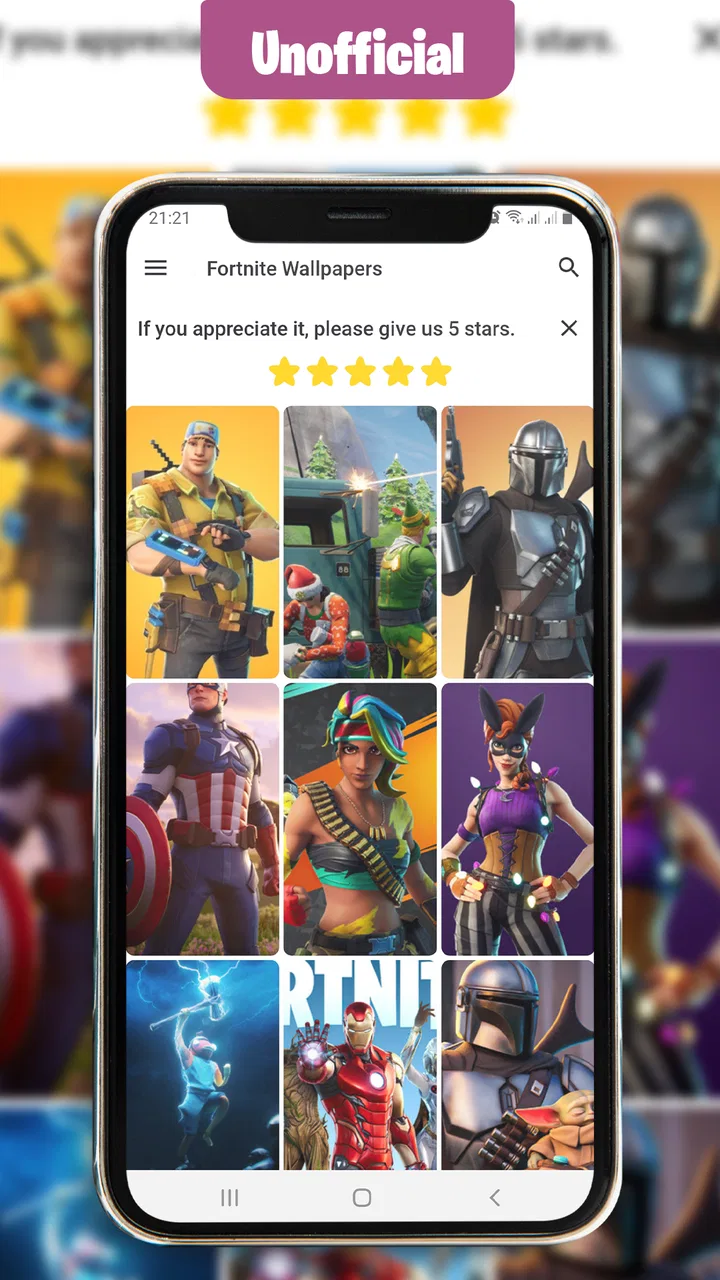
I approached Battle Royale Chapter7 Season3 as a reference app rather than as a game. Its purpose is straightforward: it gathers visual material connected with a battle-royale theme, including wallpapers, emotes, skins, and BattlePass-related content. That distinction matters before you install it. You are not opening a playable match, building a character, or joining a live squad. You are opening a themed library intended for browsing and personalizing your phone.
That made the app useful in a very specific situation. When I wanted a quick visual reminder of the season’s style, I could browse the available material instead of searching through scattered image results. The experience feels more like a fan-made reference shelf than a full companion service. It is free, aimed at Everyone, and belongs in Books & Reference rather than under the usual game category.
The app has attracted over a million installs, although its average rating sits at 2.9 from around one and a half thousand ratings. I read that combination as a warning to keep expectations sensible: there is clearly interest in the subject, but the experience is not universally smooth. Solo Devs .inc is the named developer, and the current release is version 3.7.0, compatible with Android six and later.
You May Also Like

 Blood Strike: 2.5 Anniversary
Blood Strike’s Loadouts Turn Every Drop Into a Tactical Gamble
A close look at Blood Strike’s custom loadouts: how fast access to signature weapons reshapes its battle royale rhythm, rewards preparation, and narrows the gap between fights.

 Pandora - Music & Podcasts
Pandora’s Music Is Easy to Start, but Harder to Recover
Pandora’s strength is its low-effort path from a seed to a station. Its weak spot is how much confidence it asks you to place in connection, setup, and quiet recovery.

 8 Ball Pool
 Is Built on Rivalries, Rematches, and Routine
A close look at the rivalries, rematches, shared routines, and unanswered safety questions that turn a quick pool match into a persistent mobile community.

 Samsung Music
’s Quiet Strength Is Playing What You Already Own
Its reach comes less from spectacle than from dependable access to a personal library. That simplicity is both the app’s strongest retention engine and its ceiling.

 AccuWeather: Weather Radar
AccuWeather Review: A Quick, Clear Forecast for Everyday Decisions
For everyday plans, the best forecast is the one you can understand quickly. AccuWeather makes rain timing, radar, and local conditions easy to act on, with a few trade-offs.

 Hill Climb Racing
Why Hill Climb Racing Still Turns Crashes Into One More Run
A tiny car, a bumpy hill and one more upgrade: Hill Climb Racing keeps resurfacing because its simple chaos makes every near-miss feel personal.
More From Our News Desk



From opening the app to using its material
I start by treating the app as a small visual library, so my first impression depends less on elaborate features and more on how quickly I can reach something useful. I’d go in with one clear purpose—choosing a background or checking a seasonal design—then judge whether browsing feels manageable. From there, the key question is how to use the material without expecting it to behave like a game or a full catalog.
Starting with the right expectation
The first useful step is deciding what outcome I actually want. If I need a themed image for my phone, the wallpaper material is the obvious starting point. If I am trying to remember a visual item from the season, browsing skins or emotes makes more sense. If I expect a playable battle-royale experience, this is the wrong download from the beginning.
This simple distinction prevents the most common disappointment. The store summary mentions several kinds of seasonal content, but the app itself should be treated as a visual reference and customization tool. I would not install it as a replacement for the official game, an account companion, or a news service. Its value is concentrated in quick access to themed imagery.
I also found it better to approach the app with a small task rather than an open-ended plan. “Find a background that works with my home-screen icons” is a useful goal. “Show me everything connected with the season” is much less practical because a large visual collection can become tiring to browse without a clear endpoint.
Browsing without losing the purpose
The natural workflow is to open the app, identify the type of material I want, inspect the available visuals, and then decide whether one is worth keeping or using. That sounds basic, but it changes how I judge the app. The important question is not whether it offers a deep interactive system; it is whether it helps me move from a vague interest in the theme to a usable image with as little friction as possible.
For wallpapers, I would first check the composition rather than choosing the most dramatic picture. A busy character image can look impressive in a preview but become awkward once icons and widgets cover the central area. I prefer checking whether the subject sits toward an edge and whether the background leaves enough quiet space for readable app labels. This is one of the more useful ways to turn a fan-oriented image collection into something practical.
For skins and emotes, the workflow is different. I use those sections for visual reference, comparison, and nostalgia rather than phone customization. Looking at several related images side by side can help me decide which style I actually prefer, while a single attractive preview may not tell me much about the overall set. The app works best when I treat each category as a browsing aid, not as a promise of deeper interaction.
Choosing a result instead of endlessly scrolling
A good stopping rule helps. I usually shortlist two or three images, compare them against my phone’s screen layout, and select the one that remains readable behind icons. This is more efficient than repeatedly reopening the app whenever I want a change. It also exposes an important trade-off: the most detailed artwork is not always the most useful wallpaper.
If the app lets me move from viewing to applying or saving an image, I would still check the final result on the home screen. A preview can crop differently from the phone’s actual display. When that handoff is not perfectly aligned, the subject may be cut off or the visual balance may change. The practical answer is to test the image before committing to it as a permanent background.
That small check is especially valuable on phones with different aspect ratios. A picture that looks balanced in a gallery can lose its focal point after cropping. I would rather spend a few seconds checking the finished screen than assume the preview represents the final appearance exactly.
The handoff between reference and phone personalization
The app’s most important handoff is from browsing to the phone’s own wallpaper or image workflow. The collection supplies the visual choice; the operating system determines how that choice is cropped, positioned, and displayed. If the transition feels smooth, the app has done its job even though the final presentation is controlled elsewhere.
This is also where I would pay attention to the difference between an image I enjoy looking at and one I can use every day. A high-contrast design may be exciting in the app but make notification text harder to read. A darker image may look excellent on a lock screen while making home-screen icons less clear. I would make separate choices for those two locations when the phone allows it.
For a teenager preparing a themed phone before meeting friends, the workflow is simple: browse the seasonal visuals, select an image, apply it, and check the lock screen. For someone collecting references for fan art, the result is different: the app becomes a quick visual index, while the actual drawing or design work happens elsewhere. Those are realistic uses, but neither turns the application into a full creative editor.
A realistic everyday scenario
Imagine I am waiting for a bus and want to refresh my phone’s appearance before a gaming session later that day. I open the app with a narrow goal: find a wallpaper that leaves the clock visible and does not hide my most-used icons. I browse the wallpaper material, reject the images with a crowded center, and keep one with stronger empty space near the top.
After applying it, I return to the home screen and discover that the phone has cropped the lower part of the artwork. Instead of assuming the app failed, I adjust the image position through the phone’s own wallpaper controls. The final result is less dramatic than the original preview, but it is more usable. This illustrates the app’s real role: it helps me find the starting material, while the device completes the presentation.
On another day, I might use the skins and emotes as a quick memory aid when discussing seasonal visuals with a friend. I can show the relevant artwork without launching a match or searching through unrelated web pages. The benefit is convenience, not depth.
What the app does well for focused users
The strongest part of the experience is its narrow subject. Someone who wants battle-royale-themed visuals does not have to begin with a general image search and filter through unrelated results. The app’s focus reduces that initial search effort. It is also approachable for casual users because the content is visual and the age rating is Everyone.
The free price lowers the risk of trying it. I can install it to see whether the collection matches my taste without making a purchase decision first. That matters for an app whose usefulness depends heavily on whether its particular selection appeals to me. If I find only one suitable image, I have lost little besides time and storage.
The release history also gives the app some staying power: it first appeared on February fifth, two thousand twenty, and has continued to a current version of 3.7.0. I would not treat that as proof that every part of the experience is polished, but it does make the app feel less like a completely abandoned one-off upload.
Where it compares favorably with usual alternatives
Compared with a broad web image search, this app is more focused. I do not need to invent search terms or judge every result’s relevance before reaching the seasonal artwork. That makes it convenient when I already know the theme I want and care more about browsing than researching.
Compared with a general wallpaper application, its advantage is subject specificity. General wallpaper tools usually offer much wider variety, better filtering, or more established personalization workflows, but they may not concentrate on this particular battle-royale aesthetic. I would choose the general option when I want resolution controls, broader categories, or a more refined discovery system.
Compared with the official game, this app is lighter and faster for visual browsing. The official experience is the better choice for playing, managing genuine in-game activity, and staying within the game’s own ecosystem. This app is better suited to someone who wants themed imagery without opening a full game session.
Compared with saving screenshots from gameplay, the app can be more convenient for collecting specific visual references. Screenshots often include interface elements or distracting backgrounds, while a dedicated visual collection is easier to browse. The trade-off is that I have less control over exactly what is included and how current or complete the selection feels.
Small habits that improve the workflow
I would use the app on a stable connection when first exploring it, then avoid repeatedly browsing the entire collection when I already know which image I want. This is not a claim about a particular offline mode; it is simply a sensible habit for any image-heavy app. I also keep the final selection modest rather than saving every appealing picture, because too many unused images make the phone’s gallery harder to manage.
Another useful habit is to compare an image against both light and dark icon themes if the phone supports them. A wallpaper that works with one icon style may reduce contrast with another. This check is easy to overlook because the app presents the artwork by itself, not in the exact context of my home screen.
When browsing emotes or skins, I would capture the name or visual description I need for a conversation instead of assuming the app replaces a searchable catalog. The most reliable use is visual recognition: I see something, remember it, and use that reference elsewhere. That is more realistic than expecting a complete database-style research tool.
Where the flow breaks down
The rating of 2.9 is the clearest sign that the experience has friction for a meaningful share of users. I would therefore avoid presenting it as a polished alternative to every wallpaper or reference app. A focused collection can still feel limited if the browsing path is not as smooth as I expect, if the visual selection does not match my taste, or if moving from preview to final wallpaper requires extra adjustment.
The narrow scope can also become a weakness after the first visit. Once I have found a suitable background, I may have little reason to return unless I want another seasonal image or need to check a visual reference. People who want a constantly refreshed wallpaper feed, extensive editing tools, or broad personalization will probably outgrow it quickly.
There is also a difference between recognizing a themed item and verifying detailed information about it. The app is useful when the picture itself is the goal. It is less suitable when I need structured comparisons, official availability, account details, or dependable historical documentation. In those cases, the official game or a well-organized reference source is the better handoff.
I would also be cautious about confusing fan-oriented presentation with official status. The developer is listed as Solo Devs .inc, and the app should be judged as a separate reference and wallpaper product. If authenticity, account safety, or official game functionality is central to my decision, I would go directly to the official channel instead of relying on a themed companion-style app.
Who should install it and who should skip it
I can recommend trying it to a fan who wants a free, focused way to browse battle-royale artwork and refresh a phone with that visual style. It is also a reasonable pick for casual reference, quick conversations about skins or emotes, and users who do not need a sophisticated editing suite.
I would skip it if my main goal is to play, track an account, obtain official in-game items, or receive a broad and carefully organized wallpaper service. I would also choose another option if a low-friction interface and consistently high polish matter more to me than the subject-specific collection. The modest average rating makes that a fair concern rather than an unfair judgment.
My final view is cautiously positive. This app is best understood as a focused visual shortcut, not a game and not an official all-purpose companion. Its free access and clear theme make it easy to test, while its limited purpose and uneven user response mean I would install it with a specific task in mind. If it helps me find one wallpaper or visual reference quickly, it has earned its place; if I need a complete, dependable ecosystem, I would look elsewhere.
FAQs for Battle Royale Chapter7 Season3
01What is Battle Royale Chapter 7 Season 3?
Battle Royale Chapter 7 Season 3 is a seasonal update for the popular battle royale experience, introducing a new theme, map changes, weapons, items, quests, and cosmetic rewards. Players are dropped into a large competitive arena where they must collect equipment, survive encounters, and remain inside the closing play area. The season also refreshes progression, challenges, and limited-time content.
02Can Battle Royale Chapter 7 Season 3 be played on Android and iOS?
Availability depends on the specific version, region, device, and distribution method supported by the developer. Before downloading, check the official store listing or the publisher’s website for compatible Android and iOS versions, required storage, and supported hardware. Older phones may install the game but deliver lower graphics quality, longer loading times, or unstable performance during crowded matches.
03Is Battle Royale Chapter 7 Season 3 free to download and play?
The game is generally offered as a free download, allowing players to enter matches without purchasing the core experience. However, it may include optional in-app purchases for cosmetic outfits, emotes, battle passes, bundles, or other nonessential items. Players should review the store page and account settings carefully, especially when children use the device, because purchases can accumulate quickly.
04Does Battle Royale Chapter 7 Season 3 require an internet connection?
Yes, an active and reasonably stable internet connection is required for the main battle royale matches and most online features. The game communicates continuously with its servers, so weak Wi-Fi or unreliable mobile data can cause lag, delayed actions, disconnections, or matchmaking problems. A strong connection is particularly important during competitive fights, where even a short interruption can affect the result.
05What should new players know before starting the season?
New players should expect a fast learning curve because matches combine exploration, looting, building or tactical positioning, and direct combat against human opponents. It is useful to complete introductory challenges, adjust sensitivity and graphics settings, and practice with different weapons before focusing on victories. Players should also understand that seasonal rewards and some events may be time-limited, so progress can require regular play.
Pros
- Fast-paced matches with plenty of action from the opening moments.
- New seasonal content keeps the map
- objectives
- and progression feeling fresh.
- Large player base makes it easy to find matches at most times.
- Wide range of weapons and items supports different play styles.
- Cross-platform features make playing with friends more convenient.
Cons
- Frequent updates can require substantial storage and download time.
- Competitive matches may feel difficult for beginners to enter.
- Touch controls can be less precise during intense firefights.
- In-game purchases may appeal strongly to players who want extra cosmetics.
- Performance can vary noticeably across older phones and tablets.

Battle Royale Chapter7 Season3
Gallery